Blog · Tools · Leer en español · Ler em português
My facilitation toolkit in 2026: what I use, what for, and what I stopped doing by hand
Sticky notes, Miro, Mentimeter, Copilot in Teams, AI chats and the tool I built: what each one does well and what I stopped doing by hand.
Every so often someone asks me what tools I use to facilitate, and the short answer is disappointing: the same ones as everyone else, with a few tricks of my own. The long answer is more interesting, because what has changed in the last two years isn't the list of apps but what each one does on its own while I take care of the group. This is my real toolbox, with what's good and what I don't like about each one.
I'll start with what isn't software. I still use paper sticky notes and real markers when the workshop is in person and the group is small, because writing short with a Sharpie forces you to think short, and because a full wall says “something happened here” in a way no screen can match. The downside we all know: grouping them is slow, someone has to type them up, and the photo at the end rarely turns into a decision.
For working on a shared board I use Miro, mostly in virtual or hybrid workshops (in person, the wall still wins). What I appreciate most about it today is that it has AI built in: in a workshop on business models I asked it to group the sticky notes from twenty-five people by keyword and it proposed seven reasonable groups in seconds, something that on a real wall would have taken us a good while of “and where does this one go?” The condition, which I always repeat, is not to blindly accept what it gives you: that day I moved a sticky note by hand that had been left all by itself (“Instagram-worthy”) and renamed one of the groups.
For voting and rating I've used Mentimeter a lot (in the burger joint workshop, for one), and I still consider it a good tool for conferences. It also groups open answers and tells you how many were about each topic, and it works well. What I don't like isn't its fault: when a workshop combines one board for diverging and another tool for rating, between the two there's a human copying, and that human is usually the facilitator.
In Teams I discovered something I didn't expect, which is Copilot turned on as the meeting's facilitator. Besides letting you ask it privately what was discussed in the last ten minutes (useful when you got distracted tending to a breakout room), it jumps into the chat on its own: halfway through a session it wrote, unprompted, that we were at the midpoint, what we had done and what was left, and when I asked whether any questions in the chat were still unanswered, it told me no, they all had answers. It's a note-taker that never gets tired, although it still doesn't know what's important and what isn't.
For preparing and closing I use AI chats (ChatGPT, Gemini, Claude, depending on the day and the task) with very tight instructions. The best example is deep research on your own documents: I uploaded ten files from a survey, told it not to search the internet, asked for a structure with a summary, analysis by question, prioritized gaps and an action plan, and in eleven minutes I had a report with ten citations, all to those ten files. That's gold as a starting point, and it has to be reviewed as if a very fast intern had written it.
And what did I stop doing? What I stopped doing, more than a tool, is a task: copying by hand what came out of one activity to build the next. For years I moved ideas from a board to a poll with both screens open, and in a forty-person workshop with four rounds that adds up to half an hour of a whole room watching the facilitator type. That half hour is what led me to build my own tool.
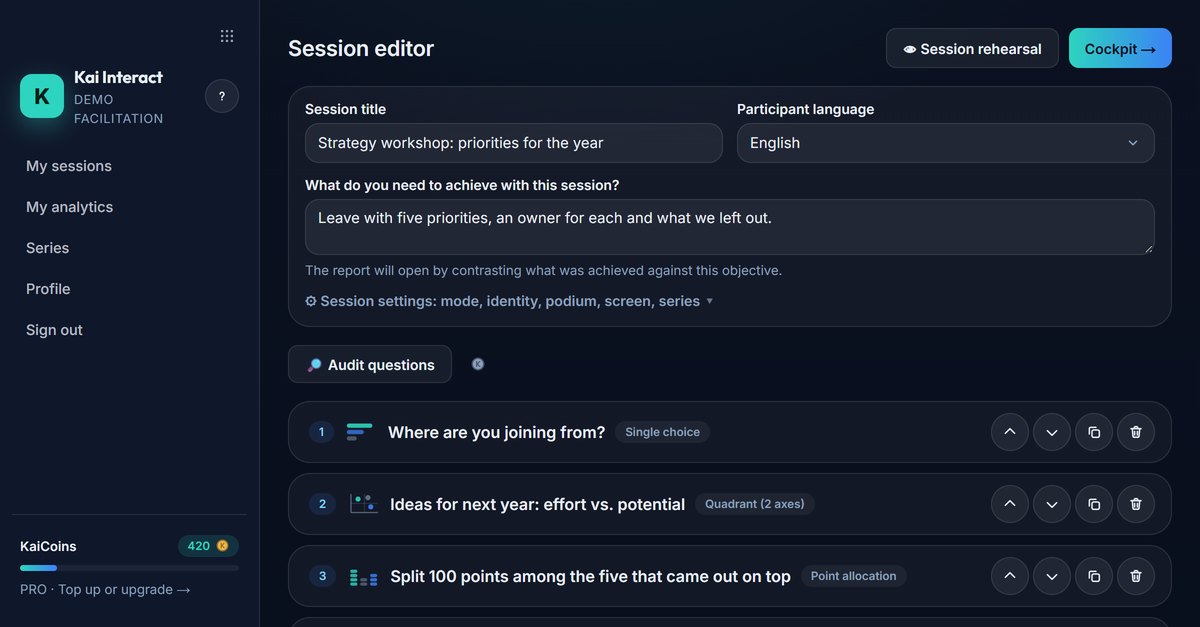
That tool is Kai Interact, and I built it myself (so read it with that bias). It handles live participation, AI grouping that gets corrected in front of the group, and closing with agreements, all in one place, and you can connect an AI assistant to it through its API so it builds the next activity from what just came out. It doesn't replace Miro when I need a big canvas, or the wall when the group needs to move.
I'd like to know what your kit looks like, especially what you use and wouldn't recommend. Which tool has cost you more time in a workshop than it saved?
See you next time. Mauro Z.