For high-stakes sessions
Your session must produce results. Not just responses.
Kai Interact is the group-facilitation platform that turns participation into understanding, decisions and commitments, with evidence you can defend in front of anyone.
A Free plan you can actually use: all 14 activities, up to 50 participants per session and enough KaiCoins for one full AI-assisted session every month. No card required.
Sound familiar?
The workshop shone… and decided nothing
Colorful sticky notes, high energy, photos of the wall. On Monday nobody remembers what was agreed or who owns it. People liked the session; the process didn't move.
The 6.0 average that hid the fight
Half the room voted 2 and the other half voted 9. The chart said “acceptable” and you moved on, over a split nobody saw and that blew up three weeks later.
Facilitating and analyzing at once is impossible
While you hold the room, manage the clock and take questions, you can't also read 40 open answers and spot the pattern. Nobody can.
“So… what came out of the session?”
The sponsor asks for results and you have photos of sticky notes and a feeling. Your work was good, but you can't prove it.
Every session without a result has a price
The decision slips another week. The group learns that participating changes nothing, and participates less next time. And your reputation lands on “it was dynamic” when it should have landed on “we left with direction”. That cost never shows up on an invoice, but you pay it every time.
What we believe
Participation is not the product: it's the raw material. A session that ends in responses stopped halfway; the real work is understanding, decision and commitment. Kai Interact exists for that last mile.
A facilitation system, not another polling app
Five pieces participation tools don't ship, because they sell interactions, not results.
Methodological journeys
Portfolio prioritization, team retrospective, change diagnostic, JTBD discovery: curated sequences where every step carries its why and feeds the next. Prefer to start from your own material? Upload your deck (.pptx, .pdf or .docx) and the AI copilot proposes the full chain of activities, anchored to your objective and your content. And before you walk into the room, an auditor reviews your questions and flags the leading, double-barreled or unbalanced ones.
Facilitator cockpit
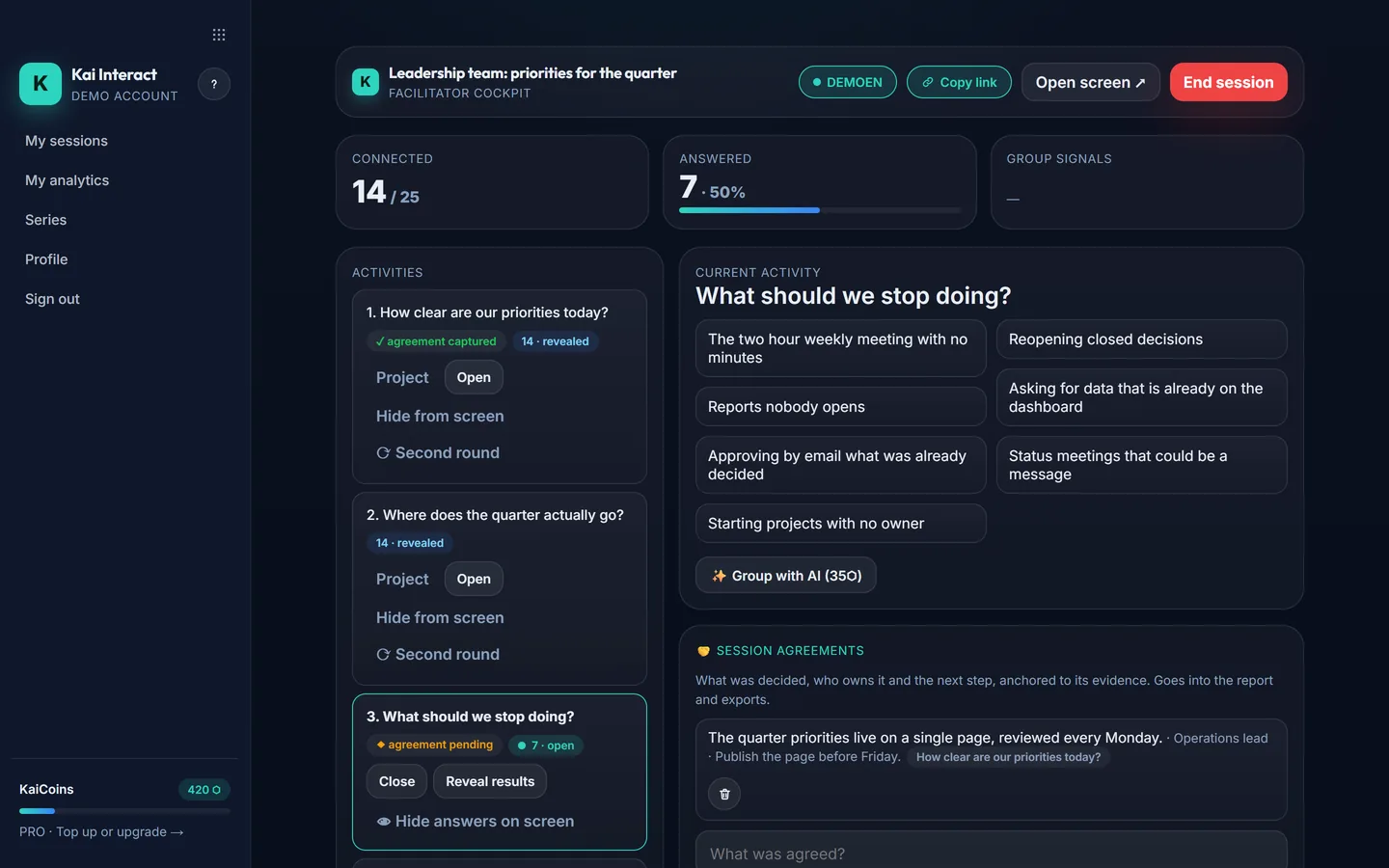
What only you see while you facilitate: who has answered, group signals (“slow down”, “I'm lost”), a moderation queue and alerts no average would give you: split room, fragile agreement, gap between segments. Every alert comes with a one-tap second round. You decide the next intervention; the platform shows you what you couldn't see alone.
Real interpretation
Full distributions instead of averages. Consensus and polarization indexes. Confidence 1-5 on every answer: a low-confidence “yes” is an agreement that will die in the hallway. A before/after second round to measure whether the discussion moved the group. Live AI grouping of open answers, projected on screen while the room watches. And all of it comparable by segment.
Decision engine
Voting is free; deciding means giving something up. A 3-variable bubble matrix (impact, feasibility, investment) with the group's real spread around each bubble, allocation of a limited budget, and pairwise comparison: head-to-head duels for when everything “matters a lot”.
A defensible result
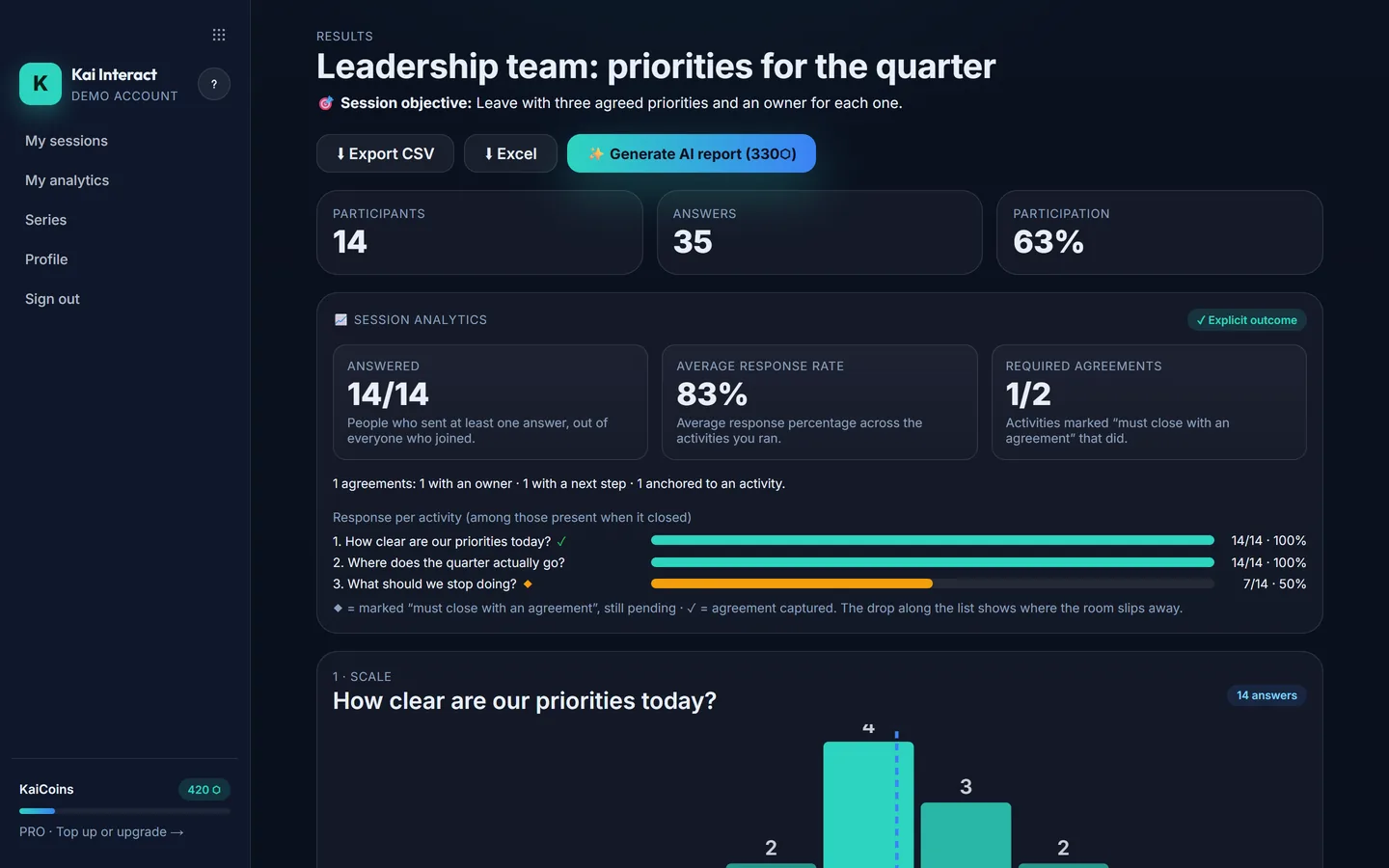
Agreements with an owner and a next step, anchored to the activity they came from. A traceable AI report that opens by checking against YOUR objective: every conclusion cites the activity and the numbers behind it. A single-use link for your sponsor, an Excel file with answers and agreements, and a dashboard with the share of your sessions that ended with an explicit result. And participants see on their phones that their input made a difference.
What a session looks like with Kai Interact
Design with method
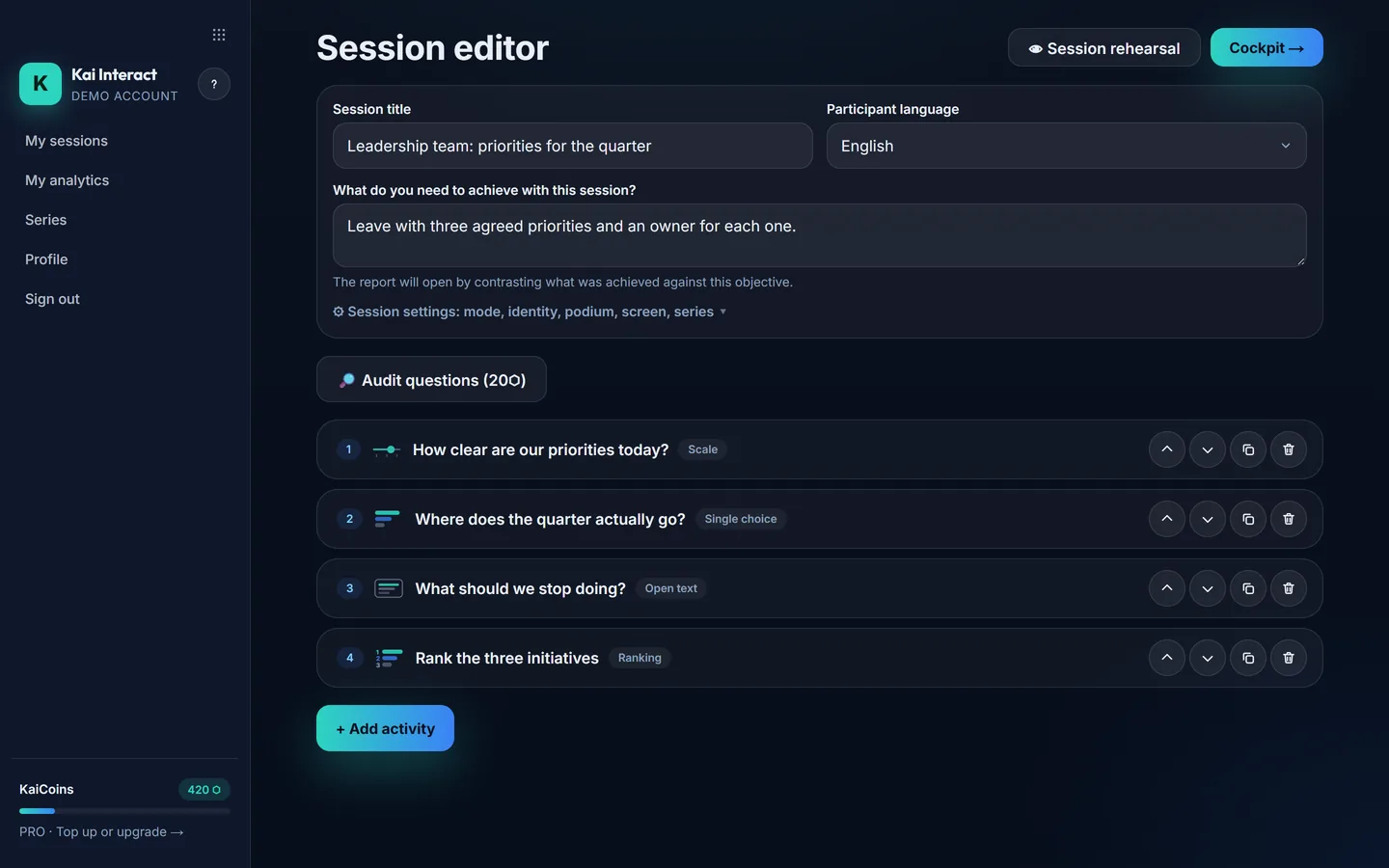
Pick a curated journey, describe your objective to the copilot or upload your deck. Audit your questions with AI and rehearse the whole session with simulated data: you see the screen and the phone before projecting anything.
Facilitate with the cockpit
Participants join with a QR code or a 6-letter code, with nothing to install and no account to create. You see what the room doesn't: alerts, signals, moderation, second round.
Close with a result
Capture agreements with owners, generate the traceable report, share it with a single-use link and compare against the next session in the series.
This is what it looks like inside
Three real product screens, taken with a demo session: the design, the live cockpit and what is left when it ends.
Your next important session already has a date
The question is whether it ends in responses or in a result. Creating the account takes a minute; designing your first session with method, about ten.
Start freeA Free plan you can actually use: all 14 activities, up to 50 participants per session and enough KaiCoins for one full AI-assisted session every month. No card required.
Which one is you?
Five different people arrive with the same doubt: “is this for me?”. Here is each one's answer, with the plan that fits.
Independent consultant or facilitator
“Can I hand my client something that justifies my fee?”
Yes: agreements with an owner and a next step, a report that cites the activity and the numbers behind every conclusion, and a single-use link for the sponsor. With Impact, the screen, the participant's phone and the summary carry your logo and your colors, not ours.
Plan: Impact if your logo has to be in front of the client; Pro if not.
Strategy, innovation or change leader
“How do I surface what the average hides and walk out with decisions, not a wish list?”
Split-room and segment-gap alerts warn you while you can still intervene. And deciding means giving something up: the 3-variable matrix, the limited budget and the pairwise duels force a choice. Commitments are captured before people leave the room.
Plan: Pro for your team; Total if you serve thousands of people a month.
Teacher or trainer
“How do I know whether they really understood, without turning the class into a game show?”
Class mode shows names only to you (the group sees initials). Confidence 1-5 separates those who know from those who guessed, before/after measures whether your explanation moved the group, and series compare the same course across dates. Podium and timer are optional: you choose the emotional register.
Plan: Classroom, the academic price, verified with your institutional email in two minutes. Free if your group fits in 50 people.
Event organizer with large audiences
“Can it handle 800 people answering at once?”
Up to 1,000 participants connected per session, with upvoted and moderated Q&A, live AI grouping of answers and automatic reconnection of every phone. And an honest warning: if all you want is trivia with music, the usual tools will do; Kai Interact shines when the audience has to leave with a reading, not a winner.
Plan: Total (5,000 participations per month) or Impact.
Occasional use
“I only have ONE important session this quarter. Do I have to subscribe?”
No. The Session pass costs US$ 6.90, one single payment: up to 200 participants, your logo, 700 KaiCoins (enough for all the AI in that session) and 7 days to open, close and reopen it. And if your group fits in 50 people, the Free plan is already enough.
Session pass, with no subscription and no renewal.
What the people using it say
No published reviews yet. The first ones will come from the pilot.
Plus everything you expect from a participation platform
The basics are here, complete and unpunished on the Free plan.
Simple pricing, nothing locked away
Unlimited sessions, all 14 activities, AI and export are in every plan, Free included. The only things that change are how many people you serve per month, how many fit at once and how many KaiCoins you get.
Subscription: one charge a year that renews on its own every 12 months, at the price then in force. Cancel whenever you like.
Free
US$ 0
- 50 participations per month
- Up to 50 participants per session
- Unlimited sessions
- All 14 activity types
- CSV export
- 1,000 KaiCoins/month
- Enough for 1 complete session
- Kai branding visible
- Results available for 90 days
Pro
US$ 10/mo
US$ 120 · billed yearly
- 500 participations per month
- Up to 500 participants per session
- Unlimited sessions
- All 14 activity types
- CSV export
- 2,500 KaiCoins/month
- Enough for ~4 complete sessions
- Kai branding visible
- Results always available
Impact
US$ 20/mo
US$ 240 · billed yearly
- 2,000 participations per month
- Up to 1,000 participants per session
- Unlimited sessions
- All 14 activity types
- CSV export
- 5,000 KaiCoins/month
- Enough for ~8 complete sessions
- Your logo and your colors
- Results always available
Total
US$ 24.17/mo
US$ 290 · billed yearly
- 5,000 participations per month
- Up to 1,000 participants per session
- Unlimited sessions
- All 14 activity types
- CSV export
- 12,000 KaiCoins/month
- Enough for ~20 complete sessions
- Your logo and your colors
- Results always available
KaiCoins pay only for the AI you actually use: auditing questions 20, grouping answers from 35, copilot 165, report from 330. A full session with AI comes to around 585. With hundreds of open answers the cost scales, and the button always shows the exact price before charging.
Put it in perspective: a two-hour session with 15 people is 30 hours of your organization's time. Pro costs US$ 12 a month; a single Session pass, US$ 6.90.
Session pass
Only need one session?
Buy it on its own and activate it on any of your sessions: up to 200 participants, your logo and colors, 700 bonus KaiCoins and 7 days to open, close and reopen it. No subscription, no automatic renewal.
Two passes already cost US$ 13.80, more than a month of Pro: the math tells you on its own when subscribing makes sense.
Teaching? See classroom pricing
Frequently asked questions
What exactly is Kai Interact?
Kai Interact is the group-facilitation platform that turns participation into defensible decisions, priorities and commitments. You design the session with method (curated journeys or an AI copilot), facilitate it with a cockpit that shows you what the room doesn't see, and close with agreements and a traceable report, not with a pretty chart.
How is it different from Mentimeter, Kahoot or Slido?
They sell interactions: polls, energy, Q&A. Kai Interact sells the capacity to take a group to a result. The difference is in what they don't ship: methodological journeys, polarization and fragile-agreement alerts, per-answer confidence, before/after, pairwise comparison with trade-offs, agreements with owners, and a report that cites its evidence.
Who is it NOT for?
If you just need trivia with music to liven up an event, or a massive Q&A for a 5,000-person conference, the usual tools will serve you, and probably cheaper. Kai Interact is for sessions whose OUTCOME matters: strategy, change, innovation, teaching that genuinely assesses understanding.
I only need one session. Do I have to subscribe?
No. The Session pass costs US$ 6.90 in a single payment and activates on the session you choose: up to 200 participants, your branding, 700 KaiCoins and a 7-day window that starts when you activate it, not when you buy it. Two passes already cost more than a month of Pro; from there, subscribing is the better deal.
Is there a price for teachers?
Yes: the Classroom plan costs US$ 70 a year, annual only, with 1,500 participations per month, up to 100 participants per session, the same KaiCoins as Pro and all 14 activities, without your own logo. You verify with an institutional email in two minutes: no contract, no letter, no waiting for approval. The academic email doesn't have to be the one on your account.
How many participants does it support?
There are two different limits. Per session, up to 50 people can be in at once on Free, 500 on Pro and 1,000 on Impact and Total. And each plan includes participations per month: 50, 500, 2,000 and 5,000. A participation is one person joining a session for the first time; reloading or coming back doesn't count again. If the month's quota runs out, the next person sees a clear notice in their language and you can upgrade on the spot; nobody already inside is left out.
What do participants need?
A browser. They scan the QR or type the 6-letter code and they're in, from a phone, tablet or computer, with no app and no account. If they lose the connection, they reconnect on their own.
Can I see how it will look before projecting?
Yes. Every activity has a preview of the phone and the screen with simulated answers that have a shape (split distributions, a clear winner), and the session rehearsal shows you the whole chain side by side. Nothing goes live until you decide.
What are KaiCoins?
The Kai family's AI currency, the same across its 8 products. They pay only for the AI you ask for: auditing your questions costs 20, grouping answers from 35, the copilot 165 and the report from 330; a full session with AI comes to around 585. Your plan includes a monthly quota (Free covers one full session; Total, about 20) and you can buy packs that never expire. The button always shows the exact price before charging and, if the AI fails, the charge refunds itself.
Doesn't the AI make up conclusions?
No: every conclusion in the report cites the activity and the numbers it comes from; no evidence, no claim. The AI only runs when YOU ask for it, and the question auditor doesn't generate content: it reviews the methodological quality of yours.
What happens to my participants' data and to my presentation?
You decide the anonymity level per session: fully anonymous, optional name, required name, or visible only to you (the screen shows initials). Answers only reach the AI when you ask to group them or request the report. The file you upload to the copilot is processed in memory and discarded: it is never stored. We comply with Colombian data law (Law 1581) and the details are in the privacy policy.
Does it work for virtual or hybrid sessions? And with PowerPoint, Teams or Zoom?
Yes, it works in virtual and hybrid settings: share the projected-screen tab in your video call and participants join from their browser, wherever they are. What doesn't exist today is an add-in inside PowerPoint, Teams or Zoom: Kai Interact lives in its own tab. What does exist is the REST API and the MCP server, through which your AI agent can create sessions from a journey, capture agreements and read results.
How do I pay, and can I cancel anytime?
By card, as a monthly or annual subscription you can cancel anytime with no lock-in, or with a one-time payment (one month or one year) through the local methods the gateway offers in your country, for example PSE and Nequi in Colombia. Prices are in US dollars. You also have our 7-day commercial guarantee and the legal right to back out of your purchase: they are different rights, and neither replaces the other.
Who is behind it?
Kai Strategy Lab, from Cali (Colombia): a family of 8 products with a single Cuenta Kai, run by a natural person identified by name and NIT in the legal notice. Write to interact@kaistrategylab.com and the person who builds the product answers.
News by email
Every now and then we write about facilitation method and about what changes in the product. No noise, and you unsubscribe whenever you want.
Let your next session end with direction, not photos of sticky notes
Create your free account and design your first session with method in 10 minutes.
Start freeA Free plan you can actually use: all 14 activities, up to 50 participants per session and enough KaiCoins for one full AI-assisted session every month. No card required.